Table of Contents
How I Got Every Page of My Website Indexed on Google — A Real Case Study
After three months of hard work, persistence, and a lot of research, every single page of my website is now indexed on Google. I am Hammad Sheikh, an SEO professional who built my own portfolio site, RankMyths, from scratch and this is the story of how I fixed critical on-page SEO mistakes and achieved full website indexing. If you are struggling with the same problem, this case study is for you.
The Problem: Most of My Pages Were Not Indexed
When I first launched my website, I focused entirely on the home page and blog pages. I kept submitting index requests through Google Search Console over and over again, but nothing worked. My services pages and category pages were completely invisible to Google. I knew something was wrong, but I could not see it on the surface.
So I did what every serious SEO professional should do — I went deep into research. I studied resources from seniors in the industry, watched hours of YouTube tutorials, and read everything I could find about why pages fail to get indexed. That research changed everything.
Understanding Why SEO Is So Important for Companies
Before I share what I fixed, let us address something fundamental: why is SEO so important for companies?
The answer is simple. If Google cannot find your pages, your potential customers cannot find your business. It does not matter how good your services are or how well-designed your website looks, if you are not indexed, you are invisible online. For any business relying on organic traffic, getting indexed is step one. Without it, there is no visibility, no leads, and no growth. This is exactly why investing in affordable SEO services is one of the smartest decisions any business owner can make.
What Is SEO and What Were My Mistakes?
What is SEO? In simple terms, SEO (Search Engine Optimization) is the process of optimizing your website so that search engines like Google can find, understand, and rank your pages for relevant search queries. It covers everything from the words on your page to the technical structure of your site.
After my research, I identified the following critical mistakes I had been making:
- Wrong keyword targeting — I was not assigning the right keywords to the right pages
- Incorrect keyword density — My content either had too many or too few keyword mentions
- Poor keyword placement — Keywords were not in the right locations on the page
- Bad URL structure — My service page slugs were not SEO-optimized
- Weak internal linking — Pages on my site were not properly connected to each other
- Duplicate or thin content — Several pages had content that was too similar or too short
- Misconfigured robots.txt — My robots.txt file was not allowing the right bots to crawl properly
- Sitemap issues — My sitemap was not correctly submitted to Google Search Console
These are the kinds of mistakes that cannot always be seen by looking at a page — but they make a massive difference to how Google reads and indexes your site.
Step 1: Keyword Research, Density, and Placement
The first thing I fixed was keyword strategy. I allocated specific, targeted keywords to each page, starting with the home page and then moving through every service page individually.
For keyword density, I aimed for 1% to 1.5% per page. This is the sweet spot, enough for Google to understand what the page is about, but not so much that it looks like keyword stuffing. I also made sure to include long-tail keywords on every page, because long-tail terms are more specific, easier to rank for, and better at attracting the right audience.
Keyword placement also matters enormously. I placed primary keywords in the page title, the first paragraph, at least one subheading, the meta description, and naturally throughout the body content.
Step 2: URL Optimization for Service Pages
One of the biggest fixes I made was to my URL structure. My service page URLs were missing a critical element, they did not reflect the service being offered clearly enough.
Before: rankmyths.com/services/on-page-seo
After: rankmyths.com/services/on-page-seo-services
This small change signals to Google exactly what the page is about. Adding the word “services” at the end of each service page URL makes it more descriptive, more keyword rich, and more aligned with what users actually search for — for example, “on-page SEO services.” I applied this same pattern to every services page on the site.
Step 3: Fixing the Robots.txt File
My original robots.txt file was the default WordPress setup basically just blocking the /wp-admin/ directory and nothing else. After research, I realized this was not enough.
I created a custom robots.txt file that explicitly allows all major search engine bots including Googlebot, Googlebot-Image, Googlebot-Mobile, MSNBot, Slurp, and others. While disallowing irrelevant or harmful bots like Robozilla, Nutch, and Baidu spider. This ensured that every important page on my site was open to crawling by the bots that matter, while keeping out bots that waste crawl budgets without adding value.
Step 4: Sitemap Submission
I generated a complete XML sitemap for the website and uploaded it directly through my hosting file manager. I then submitted the updated sitemap to Google Search Console.
A properly structured sitemap acts as a roadmap for Google. It tells the search engine which pages exist on your site and how important each one is. Without this, Google has to discover your pages by crawling links alone, which can take much longer or result in pages being missed entirely.
Step 5: Internal Linking
I also improved the internal linking structure across the site. Internal links help Google discover new pages and understand how content on your site is related. I made sure that every service page linked to relevant blog posts, and every blog post linked back to the appropriate service pages. This created a strong web of connections that made it easier for Googlebot to crawl and index every corner of the site.
Step 6: Building Backlinks for Crawl Signals
To give Google an additional signal to start crawling and indexing my site, I built over 10+ profile backlinks. These were not for ranking purposes, they were simply to let Google know the site exists and to encourage bots to visit. This is a common and effective strategy when you want to kickstart the indexing process for a new or updated website.
The Results — Why You Should Hire an SEO Expert
Two days after completing all of these corrections, I checked Google Search Console and the results were clear. All of my website pages, including the services pages and category pages that had been invisible for months, were now indexed.
This is a real world demonstration of what a proper SEO audit services process looks like. It is not just about writing content. It is about technical structure, keyword strategy, crawlability, and signals all working together.
If your website is facing the same problem, consider the lessons from this case study:
- Audit your keyword targeting — are the right keywords on the right pages?
- Check your keyword density — aim for 1% to 1.5%
- Optimize your URLs — make them descriptive and keyword-rich
- Fix your robots.txt — allow the bots that matter
- Submit a proper sitemap to Google Search Console
- Build internal links across your site
- Add a few backlinks to signal your site’s existence
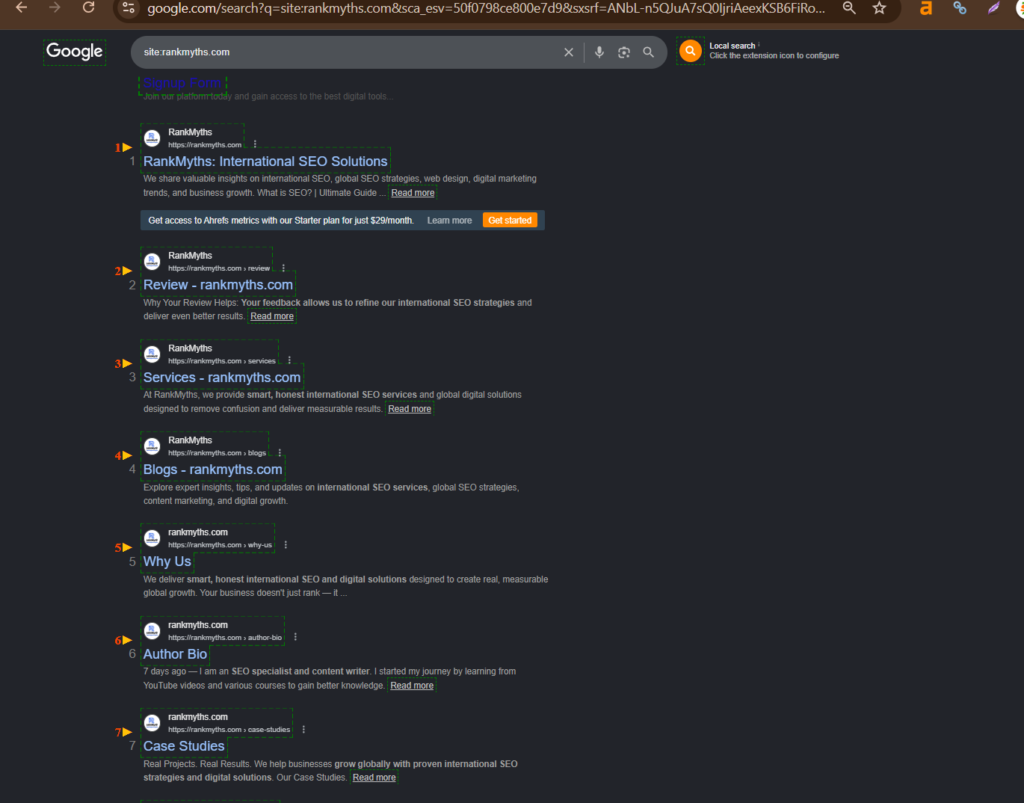
Here is the proof that all my websites pages are indexed:
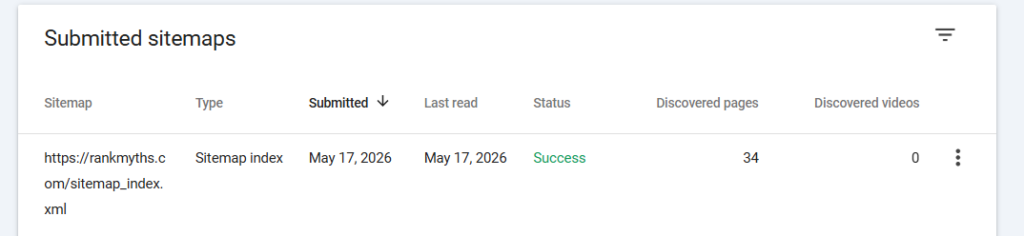
Here is the proof my sitemap has been fetched successfully:
Final Words
If you are a business owner or a website manager wondering whether to hire an SEO expert, let this case study answer your question. The mistakes I described above are extremely common and most website owners do not even know they are making them. Fixing these issues changed everything for my site in just two days.
Whether you run a small local business or a large e-commerce platform, affordable SEO services can make the difference between being invisible and being on page one of Google. Start with the basics, be systematic, and the results will follow.
My name is Hammad Shiekh, and this is the real-life story of how I indexed my website and how you can too.
Ready to grow? Let’s talk. 📧 info@rankmyths.com 🟢 +92 334 204 2038 🌐 rankmyths.com 📘 Facebook | 🐦 X (Twitter) | 📸 Instagram | 💼 LinkedIn